Foundation and guardrails
Is the platform ready to be observed safely?
Before a single metric flows, give observability a governed home — a dedicated compartment, least-privilege IAM, consistent tags, secrets in Vault, and tenancy-wide Audit.
Enterprise observability on Oracle Cloud Infrastructure
A guided map of OCI Observability and Management. Pick your use case and follow the path from L0 to L4, enabling each service when your use case needs it.
An independent, community project — not an Oracle product. It exists to simplify understanding of Oracle's observability tools.
Pick your persona and your industry — we'll point you to the right levels, services, and lens, rather than starting from a product list. Access to every view shown here is governed by OCI IAM: each persona maps to an OCI Group with policies scoped to the right compartments.
Choose the pattern that looks most like your estate. We will show where to start and the exact services to add, then dim everything else on the ladder so the route is clear.
· select any service to inspect it
Each level answers a sharper question than the last, from governance through classic observability to AI agents. Select any card to open the inspector, then switch lenses for an executive, architect, or practitioner view, with copy-ready snippets.
Is the platform ready to be observed safely?
Before a single metric flows, give observability a governed home — a dedicated compartment, least-privilege IAM, consistent tags, secrets in Vault, and tenancy-wide Audit.
Is it healthy, and what just happened?
Turn on the three native pillars — Monitoring, Logging, and Audit — plus the routing layer of Notifications and Events. Actionable alarms only, severity by business impact, and the right alert to the right channel.
Why did it happen, and are we running out of room?
Make databases a first-class domain — Database Management for live diagnosis, Ops Insights for capacity and forecasting, Log Analytics for root-cause work, and the Management Agent for hybrid reach.
What is the business impact, and what can the platform handle on its own?
Stitch traces, logs, metrics, and database signals together with APM and OpenTelemetry, move data with Connector Hub, automate through Events, and layer on AI-assisted operations and forecasting.
Is the agent correct, grounded, safe, and getting better — and what can it do?
Agents are non-deterministic and drift silently, so they need more than the three pillars. Trace every reasoning step, judge output quality with a governed model, detect anomalies the SOC can read, and evolve under gated control — paired with Zero Trust enforcement and the OCI Secure AI Framework. See the deep dive below.
Most telemetry reaches OCI through an agent. Three types cover the cases — pick by where the target runs and what it emits. Use the Oracle Cloud Agent whenever it fits; reach for the others for hybrid targets and custom logs.
Preinstalled on OCI compute instances and the recommended default whenever it fits.
Low-latency interactive collection between OCI and IT targets, including external and on-premises.
Open-source, fluentd-based ingestion of custom logs into OCI Logging.
Source: "Demystifying logging and monitoring agent types in OCI Observability and Management" — Royce Fu, OCI Observability blog.
Autonomous agents fail in non-obvious ways — a confident but wrong answer returns a normal status code. OCI answers this with three connected disciplines across the AI adoption lifecycle.
"Zero Trust decides what an agent is allowed to do. Observability tells you what it actually did — and whether it is getting better or worse. You need both."
The umbrella. Secures three surfaces — models, data, and agents — with six principles across the adoption lifecycle. Ships through the Enterprise Landing Zone as policy-as-code.
Defines what is securedThe agent execution trust boundary. A policy gate and broker scope identity, allow-list tools, and authorize each action at the moment it happens — producing a decision ledger.
Decides what an agent may doThe detective and evaluative half. Trace agent behaviour, judge it with LLM-as-a-judge, detect drift, and evolve under gated control. The decision ledger becomes a primary data source.
Tells you what it actually didOne OpenTelemetry instrumentation feeds OCI Observability and Management and an open-source stack, then evaluation and action. Select any service to inspect it.
OpenTelemetry GenAI conventions
Agent, tools, and broker Zero Trust decision ledgerRedact and route
OpenTelemetry CollectorOCI O&M + open source
Grafana · Prometheus · Tempo · LokiLLM-as-a-judge
Gate, govern, alert
Tighten Zero Trust policyThe pipeline ends in action, not a dashboard — evaluation results and detected drift flow into the controlled-evolution loop and back into Zero Trust policy. Based on the OCI AI Observability for Agents whitepaper.
The same observability estate looks different to each role. Here is what each persona recognises, what they do with it, and the levels they live in.
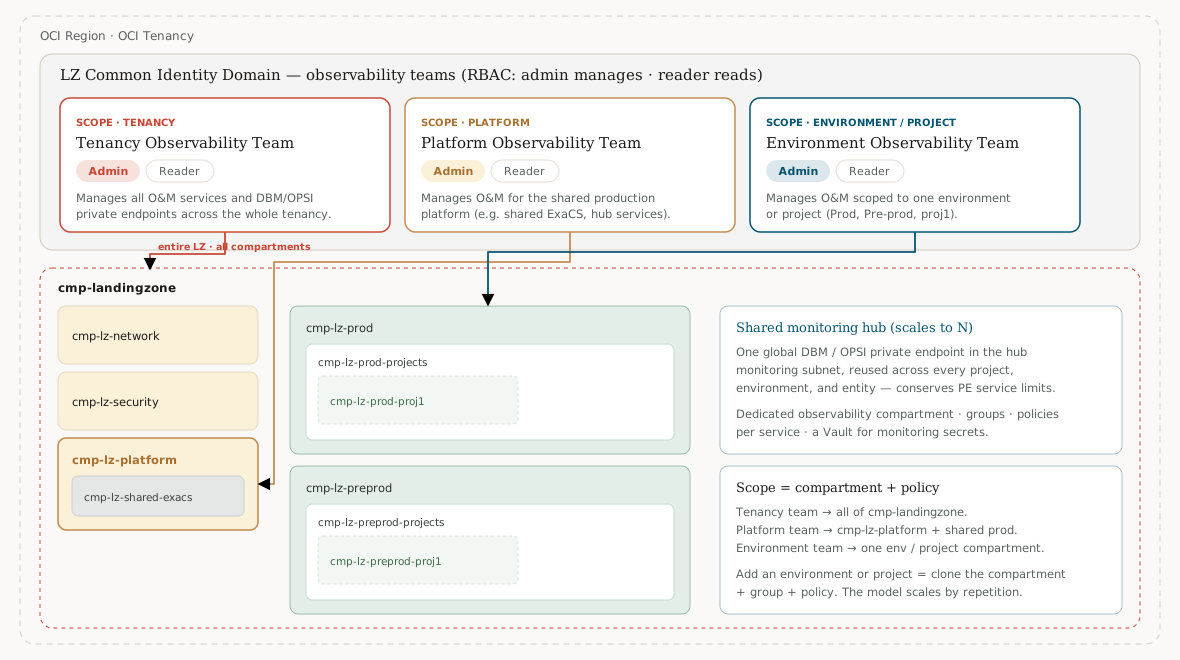
These views and rights are not ad hoc — each persona maps to an OCI Group with policies scoped to the right compartments. The pattern is two levels per scope: an admin group that manages the services, and a reader group with read-only access for monitoring and reporting. The groups live in the Landing Zone Common Identity Domain. See the scoping model below.
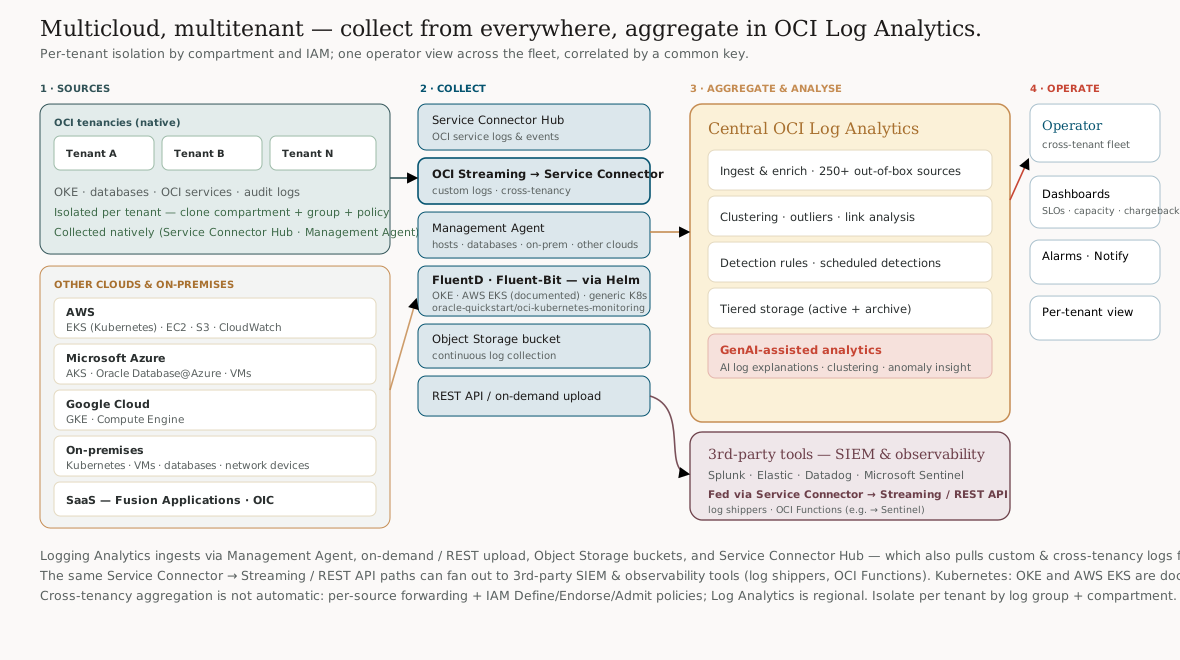
The multitenant approach is not just access scoping. The real model is centralized aggregation: forward telemetry from every tenant and every cloud into a central OCI Log Analytics, correlate it by a common key, and analyse it with machine learning and GenAI — while keeping each tenant isolated by compartment and IAM. Cross-tenancy collection is not automatic — it relies on per-source forwarding plus IAM cross-tenancy policies. This is a custom build on the native services for operators running OCI Alloy, Dedicated Region (DRCC), or a multitenant ISV / SaaS platform.
The documented OCI Logging Analytics ingestion paths are the Management Agent, on-demand / REST upload, Object Storage buckets (continuous collection), and Service Connector Hub — which also pulls custom and cross-tenancy logs from OCI Streaming. It ships 250+ out-of-the-box sources, tiered active-plus-archive storage, ML clustering and link analysis, detection rules, and GenAI-assisted analytics. The same Service Connector → Streaming / REST API paths can also fan out to 3rd-party SIEM and observability tools (Splunk, Elastic, Datadog, Microsoft Sentinel) via log shippers or OCI Functions. Kubernetes: OKE and AWS EKS are documented via the Helm chart.
The diagram is not aspirational — each collection and export path maps to a working repository. Mix and match to ingest from any cloud into OCI Log Analytics, or fan OCI telemetry out to a third-party SIEM.
Stream Google Cloud logs into OCI Log Analytics — serverless, no VMs to run.
adibirzu/gcplogs2oci ↗ Azure → OCIForward Azure platform and resource logs into OCI Log Analytics.
adibirzu/azurelogs2oci ↗ Kubernetes → OCIFluentD (logs) + Management Agent (metrics), deployed by Helm. OKE and AWS EKS documented.
oracle-quickstart/oci-kubernetes-monitoring ↗ OCI → SplunkKafka Connect streaming from OCI into Splunk indexes for SIEM correlation.
adibirzu/oci-splunk ↗ OCI → SentinelTimer-triggered Azure Function reads OCI Streaming, enriches, and ships to Sentinel — E2E tested.
adibirzu/oci2azurelogs ↗ LA contentReusable Logging Analytics sources and parsers for security and operations use cases.
adibirzu/LoggingAnalyticsFiles ↗ ZPR → LACollect and correlate ZPR flows into Log Analytics detection dashboards.
adibirzu/oci-zpr-visibility ↗ ReferenceShop + CRM + Java sidecar with APM, Monitoring and Log Analytics assets, load and autoscaling.
adibirzu/octo-observability-demo ↗Within each tenancy, access is scoped by compartment and IAM — Tenancy, Platform, and Environment / Project observability teams, each an admin and a reader OCI group. Adding a tenant, environment, or project is repetition: clone the compartment, group, and policy.
Pick a host tenancy and source tenancies; route via Service Connector Hub, Streaming, or Object Storage; and grant the IAM cross-tenancy Define / Endorse / Admit policies. It is not automatic.
A log group and compartment per tenant — access control rides on compartment-scoped log groups, not on a shared tenant_id field alone.
Management Agent install keys per target tenancy and namespace, secrets in Vault, key rotation, and Management Gateway or private egress for hybrid sources.
Private endpoints and Service Gateway where applicable, Zero Trust Packet Routing and segmentation, and an audit trail of operator access.
Log Analytics is regional. Cross-tenancy sharing requires source and target tenancies subscribed to the same regions; honour residency boundaries.
Plan ingest volume, active and archive retention, recall cost, Connector Hub delivery semantics, duplicate handling, and service limits.
The ladder maps cleanly onto an observability maturity model. Find your current state, and the next column is your next move.
Tenancy and Landing Zone exist, with little to no governed telemetry. Monitoring is ad hoc or absent.
maps to · pre-Level 1Infrastructure metrics, central logging, basic alarms, and notification standards. Troubleshooting is manual.
maps to · Level 1 to 2Database performance monitoring, SQL diagnostics, capacity forecasting, and log analytics are in play.
maps to · Level 3Distributed tracing, telemetry correlation, anomaly detection, automated remediation, and service SLOs.
maps to · Level 4 to 5Curated from the Oracle DevRel technology-engineering observability library, the OCI Observability blog, and team publications. Open any service in the ladder to see the relevant links inline.
The OCI AI Observability for Agents whitepaper cites this as its worked example. A multi-service drone-retail stack where every browser click, FastAPI request, Spring Boot span, and Oracle ATP query share one trace context — and a GenAI multi-agent workflow traced end to end into OCI APM and Langfuse. Deploy in 5–10 minutes with OCI Resource Manager.